Cyberix3D 2.1.1 is now available!
This update introduces the new
Asset Library — one place to browse, search and manage all your game assets — along with full editor control for MCP agents, Google sign-in, live material editing, and a set of editor and mobile improvements.
Asset Library
A new
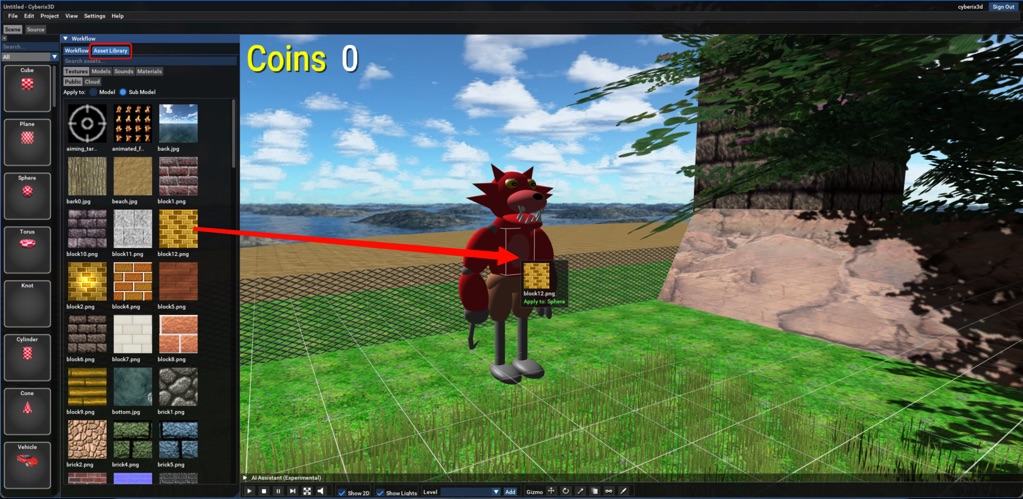
Assets tab in the editor lets you browse, search and manage all your game assets in one place — textures, 3D models, sounds, and the project's materials — from three sources: the public library, your cloud uploads, and local files on your own computer.
Drag a texture or material onto any object to apply it — to the whole model or just the part under your cursor.
Drop a model into the scene and it appears right at the drop point, automatically scaled to fit.
Drop a sound to add it to your game, ready to play.
You can also drag files straight from your computer into the editor to import them, upload assets to your cloud account, and export or delete existing ones.
MCP: Full Mouse & Keyboard Control — With Your Permission
An AI assistant connected over MCP can now
control the keyboard and mouse to operate the editor and your game — click, drag, scroll, and type — for a true hands-on build-and-verify loop: the agent can play your game, press the actual buttons, and see the result.
And a new
permission system keeps you in charge: the first time an agent tries a sensitive action — running the game, managing projects, exporting, or keyboard and mouse control — the editor asks you to approve it (
once,
always, or
deny). You can review and change each permission at any time in the MCP settings dialog.
Sign in with Google
You can now log in to your Cyberix3D account with one click using your Google account, through a refreshed login dialog.
Full File Menu
Save As, Rename, and Close now work from the File menu — for both projects and plugins.
Live Material Editing
Material changes — color, alpha, texture — now apply instantly in the scene while you edit, with lighting refreshed and cloned objects staying in sync. No re-run needed.
Better Object Selection
Hold
Shift while clicking with the gizmo to select a sub-model inside a model, or turn on the new setting to select sub-objects directly by default.
Editing on Mobile
The movement joystick responds reliably again, sits below the top panel, and no longer spins the camera while you steer. Editor tabs now switch with a single tap.
Bug Fixes & Stability
This release also includes bug fixes and stability improvements across the editor, engine, and exported games.
Update Now
If you already have Cyberix3D 2 installed, simply launch the editor and it will update automatically through the built-in update system.
Download
*
Windows download: Cyberix3D2Setup-2.1.1.exe
*
Web version: https://www.gamemaker3d.com/new-cyberix3d
Thanks to everyone testing and sharing feedback — every update gets us closer to full compatibility and an even better creation experience.
-- Cyberix3D Team
 Google Sign In