Remember me
You are here: HomeForum
Welcome, Guest
Username: Password: Remember me

TOPIC: The new Cyberix3D update

The new Cyberix3D update 6 months 1 week ago #3620

  • cyberix3d
  • cyberix3d's Avatar
  • NOW ONLINE
  • Administrator
  • Posts: 803
  • Thank you received: 812
Hello all,

Here are some new improvements:

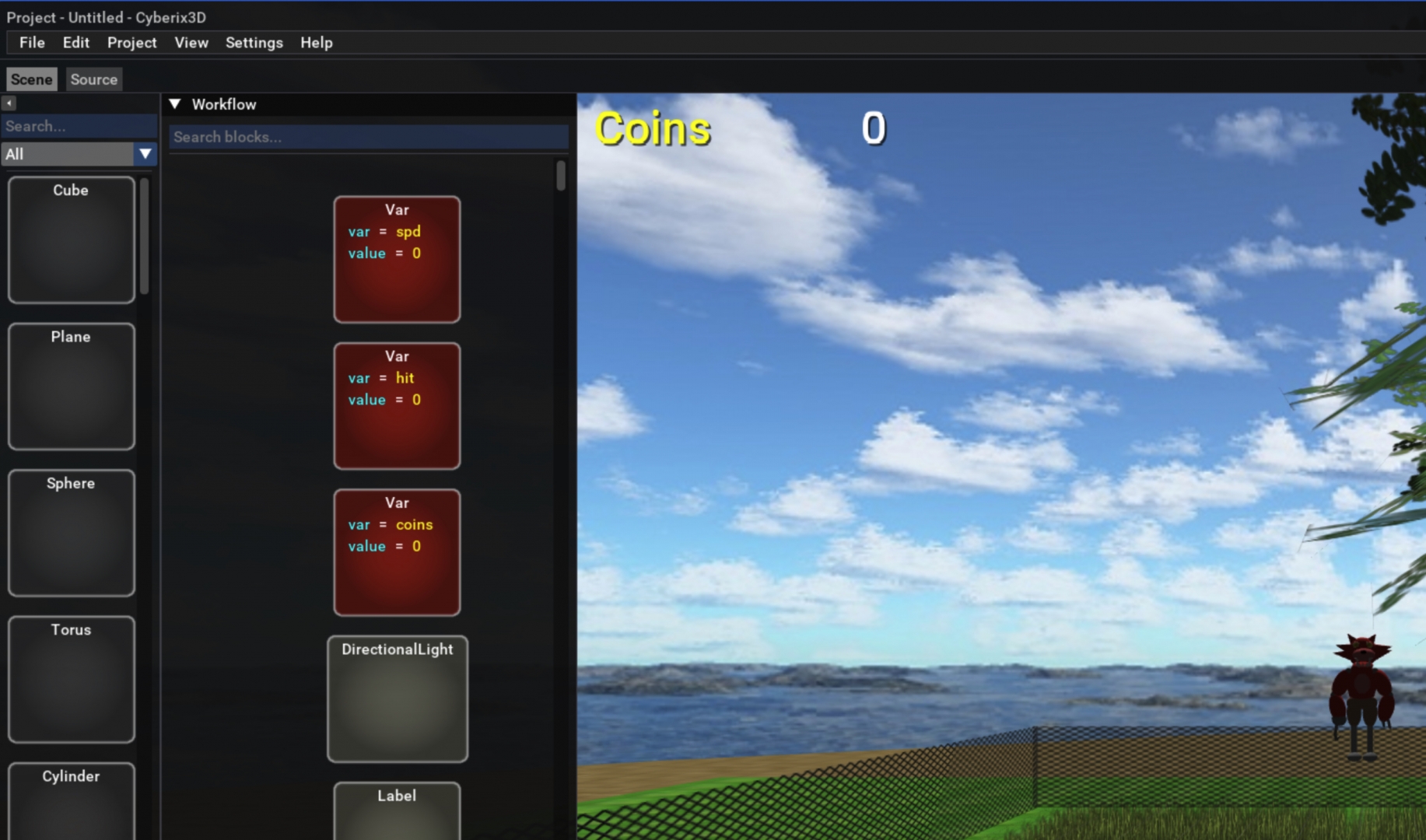
Workflow Search – Quickly find blocks in your workflow using the new search bar. Type to filter and instantly locate the blocks you need

Command Palette Search – The Command Palette now includes a search field to help you find commands faster

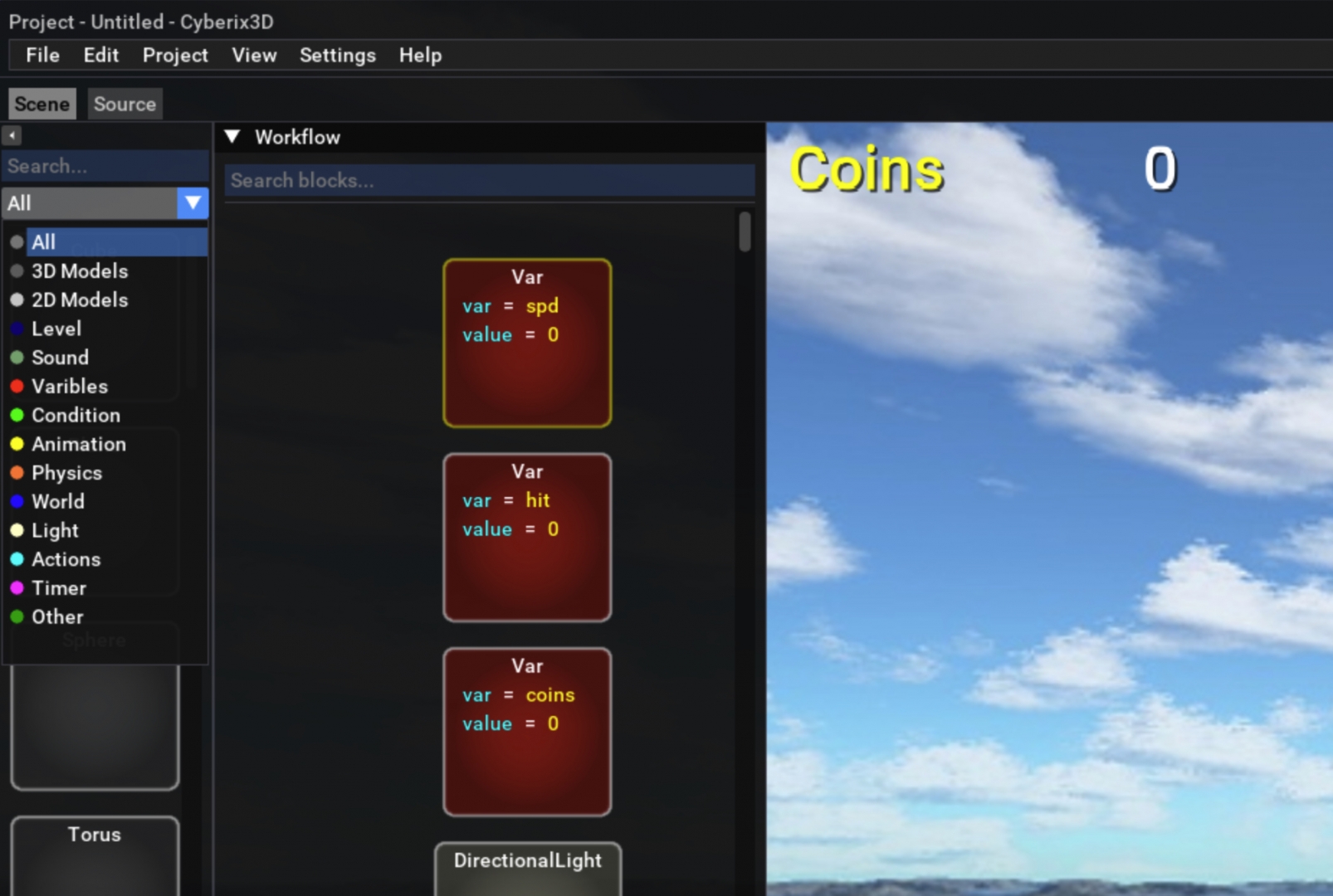
Block Categories Dropdown – Block categories have been redesigned from buttons to a compact dropdown menu with colored indicators, providing a more modern look and saving screen space

Asset Loading Fix – Fixed an issue where some game assets occasionally failed to load

Mobile Improvements:

Touch Scroll vs Drag Detection – Improved distinction between scrolling and dragging on mobile. Swipe to scroll through blocks, or long-press (0.5s) to start dragging a block. This prevents accidental drags while scrolling

Scroll Position Preserved – After dropping a block in the workflow, the scroll position is now maintained instead of jumping back

block_categories1.jpg


block_categories2.jpg


You are welcome to try the new features:
www.gamemaker3d.com/new-cyberix3d

If you're having trouble loading the new version or don't see the changes, try clearing your browser cache.

– Cyberix3D team
Last Edit: 6 months 1 week ago by cyberix3d.
The administrator has disabled public write access.
The following user(s) said Thank You: ViraX, whinter

The new Cyberix3D update 6 months 3 days ago #3621

  • cyberix3d
  • cyberix3d's Avatar
  • NOW ONLINE
  • Administrator
  • Posts: 803
  • Thank you received: 812
Hello all,

We've updated the New Cyberix3D Editor with significant improvements, especially for mobile users.
The editor now fully supports mobile devices, allowing you to create and edit games on both desktop and mobile with a consistent and optimized interface for each platform.

Here's what's new:
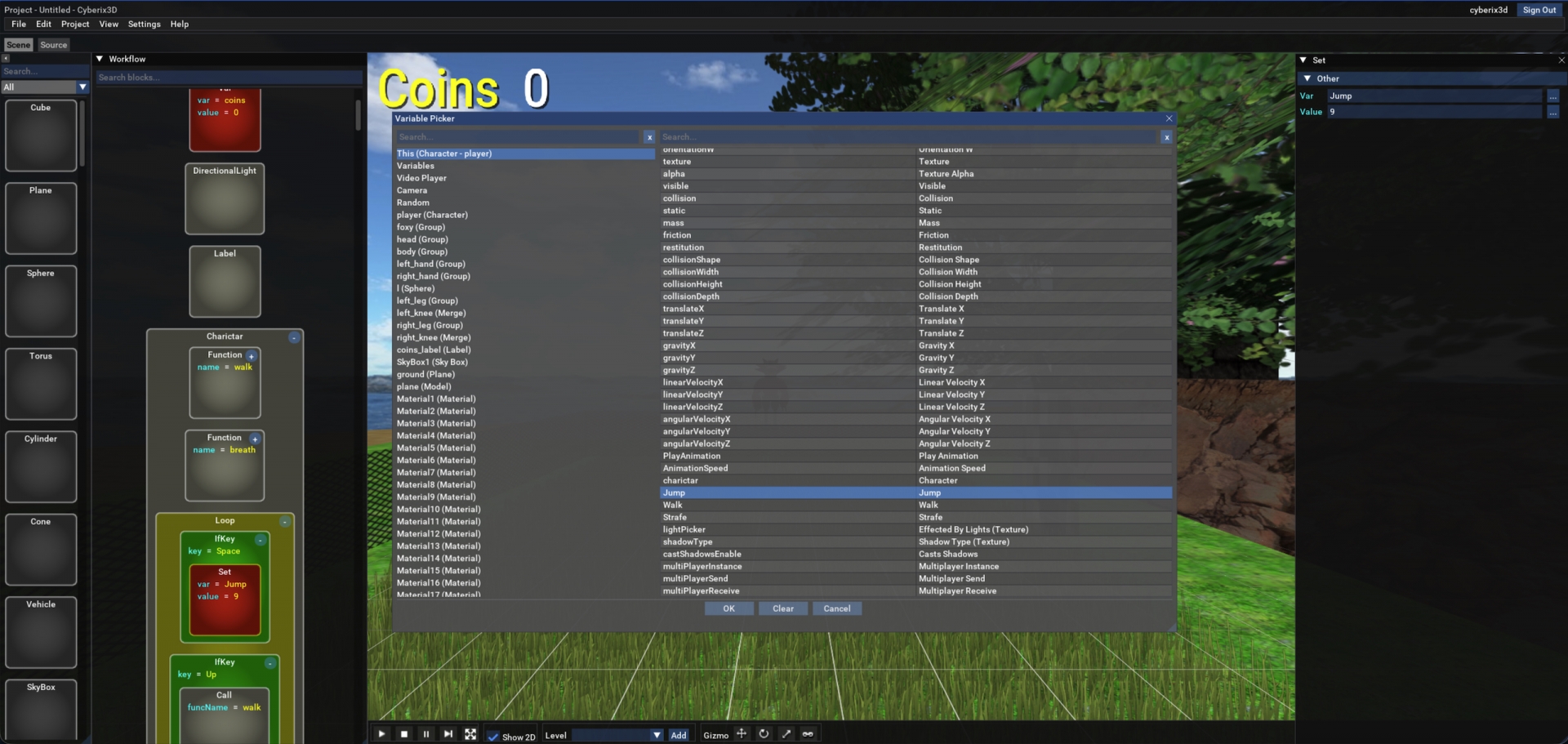
Variable Picker – Added to the new editor. Now highlights the currently selected variable when opening the picker, and includes search bars for quick filtering.

Attributes Editor Mobile Support – The attributes editor now works fully on mobile devices, allowing you to edit all game properties on the go.

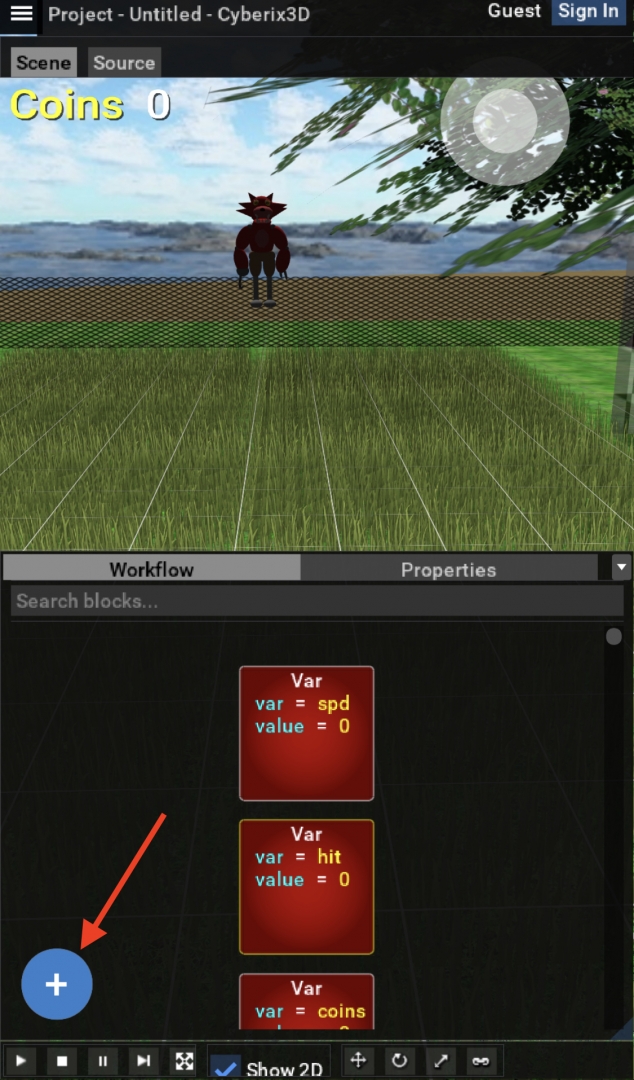
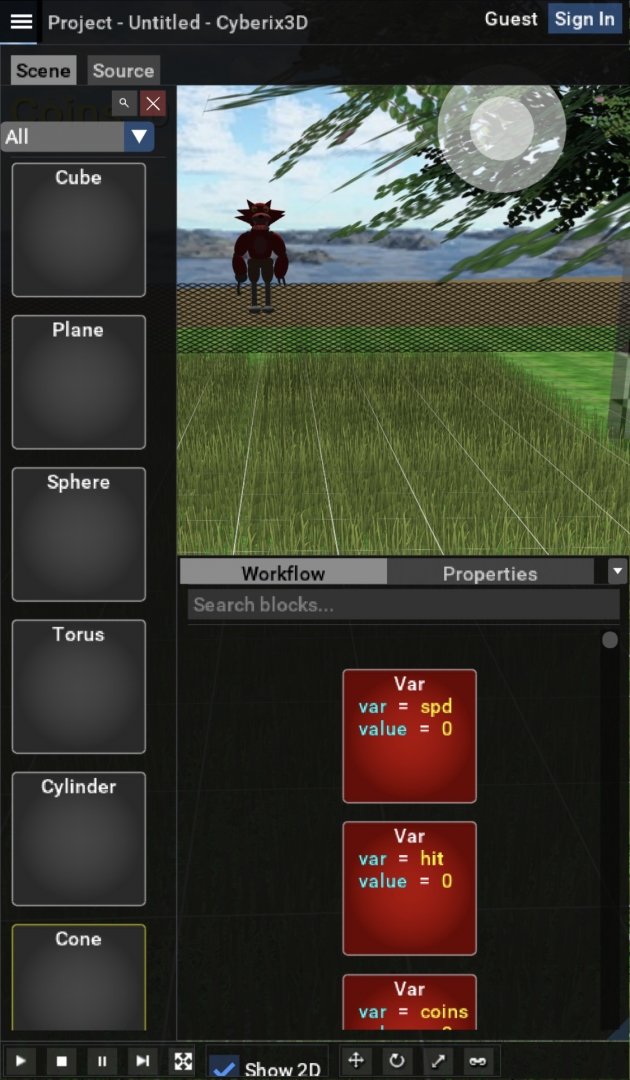
Floating Add Button – A new (+) button on mobile opens the command palette, allowing you to add blocks without taking up screen space.

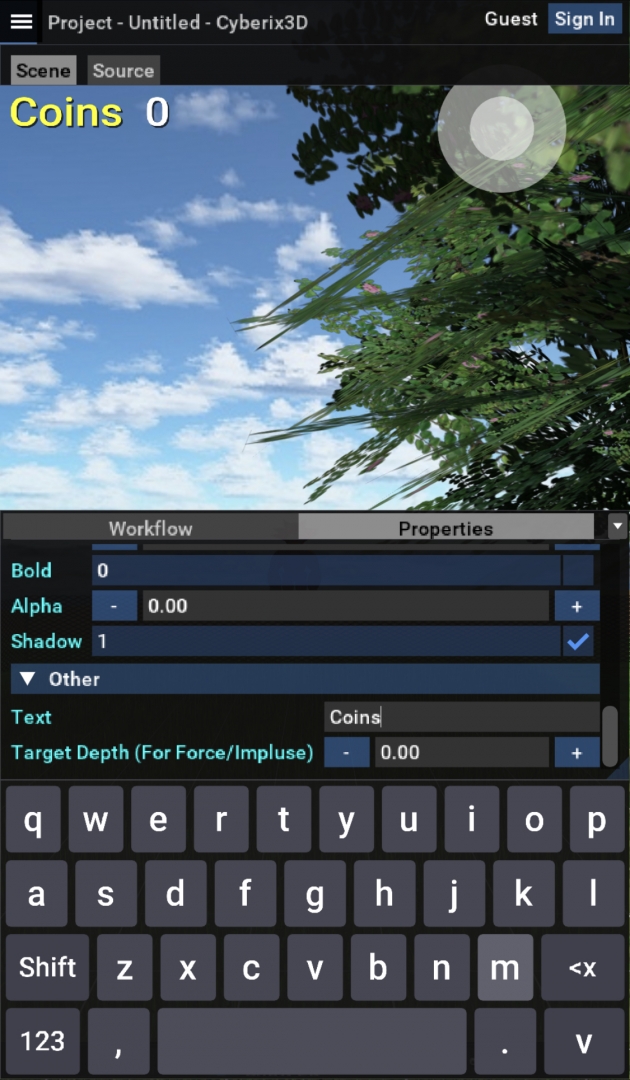
Virtual Keyboard – Text and number fields open a virtual keyboard on mobile, providing a smooth editing experience on touch screens (English only for now).

Smart Touch Detection – The system distinguishes between scrolling and tapping. The keyboard only opens when you tap a field, not when scrolling through the list.

Visual Improvements – Blocks render with cleaner colors, and fixed various UI flickering issues.

Stability Improvements – Fixed bugs that caused crashes.

var_picker.jpg


virtual_keyboard.jpg


mobile_add_button.jpg


mobile_add_button_pressed.jpg


You are welcome to try the new features:
www.gamemaker3d.com/new-cyberix3d

If you're having trouble loading the new version or don't see the changes, try clearing your browser cache.

– Cyberix3D team
Last Edit: 6 months 3 days ago by cyberix3d.
The administrator has disabled public write access.
The following user(s) said Thank You: ViraX

The new Cyberix3D update 5 months 5 days ago #3627

  • cyberix3d
  • cyberix3d's Avatar
  • NOW ONLINE
  • Administrator
  • Posts: 803
  • Thank you received: 812
Hello everyone,

We’re excited to share a major update to the Cyberix3D Editor!

The new Cyberix3D Editor includes several significant features, improvements, and stability enhancements:

Lighting
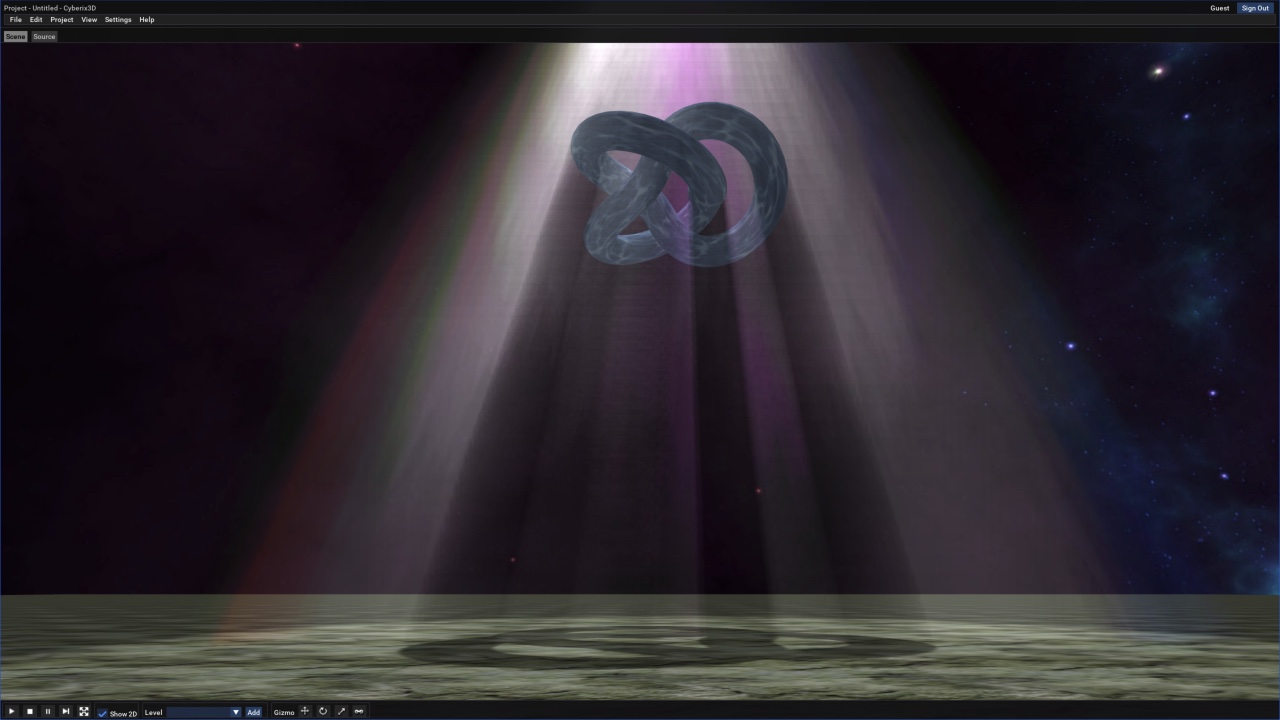
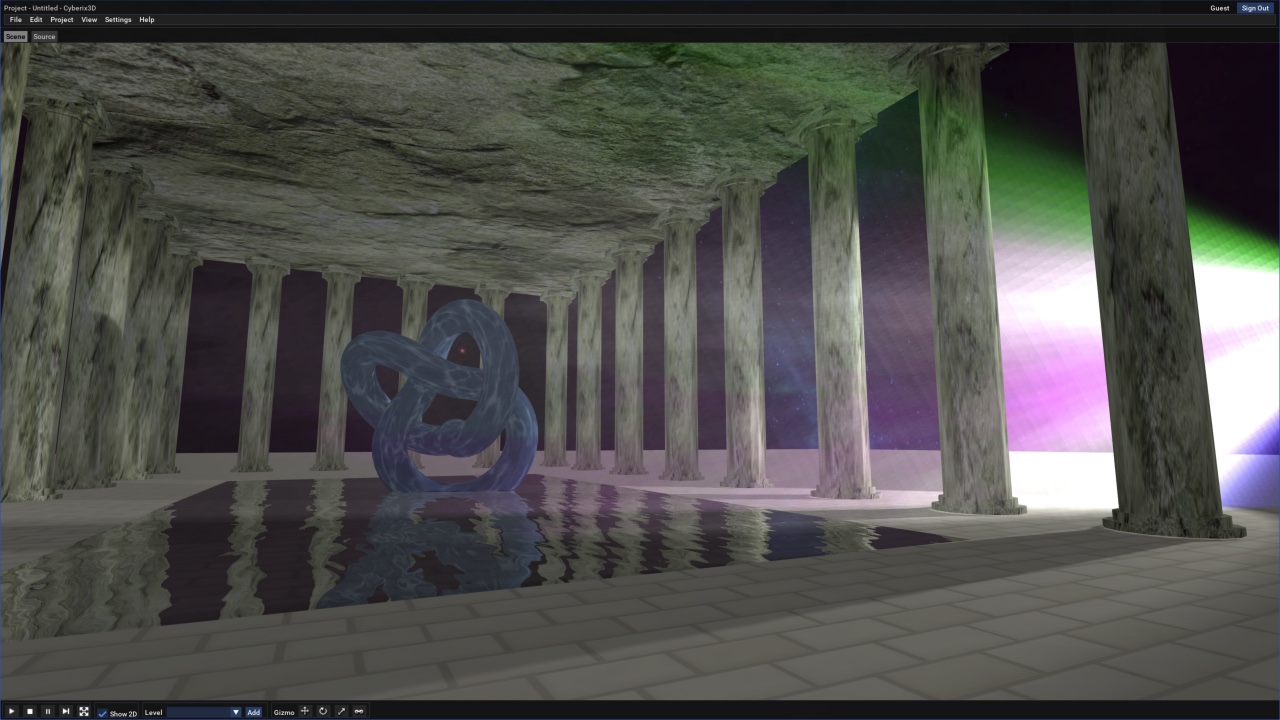
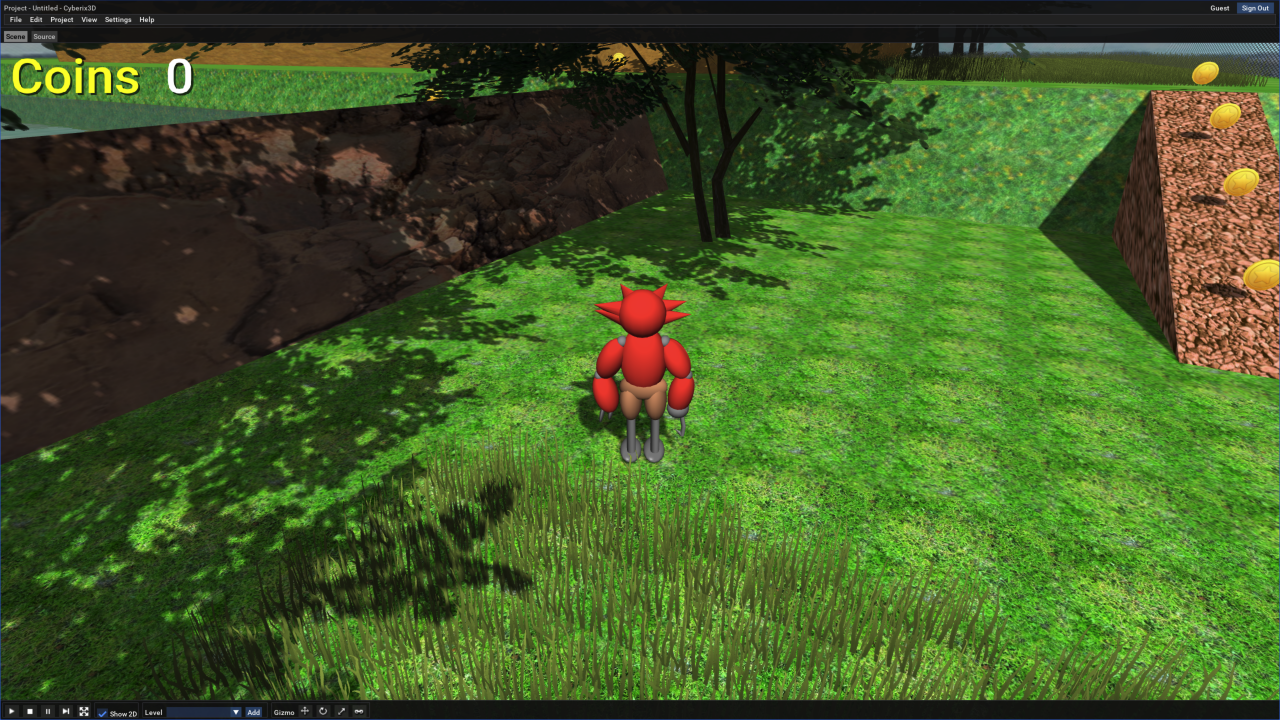
We’ve added support for multiple light types: Directional Light, Point Light, and a new Spot Light that also supports volumetric lighting (God Rays).
In addition, the new project templates were updated to include examples showcasing these lighting features—feel free to check them out.
You can now also enable or disable lighting directly in Edit Mode using a new Show Lights checkbox, making it easier to work on scenes with or without lighting.

Shadows
Shadow support has been added for all light types. We’ve also introduced a new SetupShadow command, allowing you to control shadow distance and quality.
Shadows are now rendered at a significantly higher quality compared to the old Cyberix3D engine, and can be configured to cover much longer distances while still maintaining high visual quality.
Shadows also support semi-transparent materials, so for example, leaves on a tree will cast realistic leaf-shaped shadows—something that was not supported in the old Cyberix3D engine.

Knot Primitive
A new Knot 3D primitive is now available. You can add it to your scenes and configure it as needed.

Right-click Duplicate / Delete
You can now duplicate or delete blocks and models directly by right-clicking them in the workflow or scene view.

Bug Fixes & Stability Improvements
We’ve fixed several bugs and made overall stability improvements to ensure a smoother and more reliable editing experience.


You’re welcome to test the new features and share your feedback.
www.gamemaker3d.com/new-cyberix3d

SCR-20260204-svmq.jpeg


SCR-20260204-svgf.jpeg


SCR-20260204-swac.png


Regards,
The Cyberix3D Team
Last Edit: 5 months 5 days ago by cyberix3d.
The administrator has disabled public write access.
The following user(s) said Thank You: ViraX, nima

this editor looks old 5 months 5 days ago #3628

  • fan_lover
  • fan_lover's Avatar
  • NOW ONLINE
  • Junior Boarder
  • Posts: 30
  • Thank you received: 3
this might be the same editor since the beginning of cyberix3d game maker development started in 2014.I tried it and i was not a big fan of this update so i use my downloaded cyberix3d editor and if you have updates for the cyberix3d editor, just tell me.

regards
Fan_lover (Darren lee Sheldon Jr)
The administrator has disabled public write access.

this editor looks old 5 months 5 days ago #3629

  • cyberix3d
  • cyberix3d's Avatar
  • NOW ONLINE
  • Administrator
  • Posts: 803
  • Thank you received: 812
Hello,

Just to clarify, the new Cyberix3D Editor is not only a web-based editor.

The new editor is designed as a multi-platform solution and is planned to be available on:
• Windows
• Linux
• macOS
• Android
• iOS
• Web (browser-based)

The web version is intended for users who prefer not to download or install anything and want to work directly from the browser. This is especially useful for Chromebooks, schools, and educational environments, where installation is often restricted and Cyberix3D can be taught and used instantly.

The desktop versions (Windows, Linux, macOS) will offer several advantages:
• Improved performance compared to the web version
• Native resolution support, including 4K
• Support for offline asset files, allowing much larger asset libraries without being limited by online storage constraints

The web version, while very convenient, is currently limited to Full HD resolution and generally lower performance compared to native desktop applications—but its main advantage is that no installation is required.

The desktop editor will be available for download once development is complete and the first alpha version is released.
In the meantime, the web version allows you to preview and follow the development progress, giving early access to new features as they are being implemented.

Development of the desktop applications is ongoing.
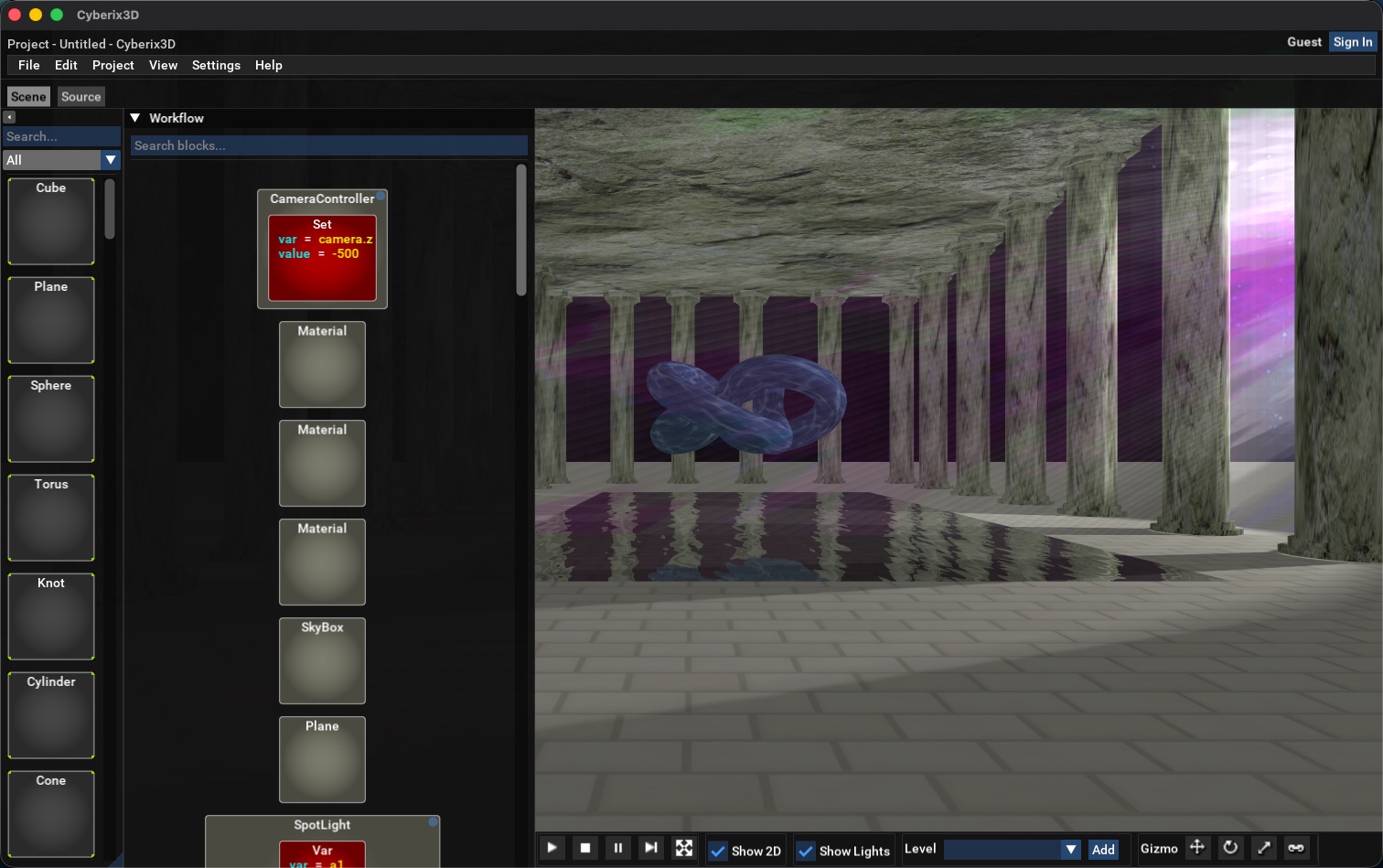
Below is an example image from the macOS version, which we are actively using and testing during development.

SCR-20260205-mcoq.jpeg


Regards,
Cyberix3D team
Last Edit: 5 months 5 days ago by cyberix3d.
The administrator has disabled public write access.
The following user(s) said Thank You: ViraX, nima

this editor looks old 5 months 3 days ago #3633

  • fan_lover
  • fan_lover's Avatar
  • NOW ONLINE
  • Junior Boarder
  • Posts: 30
  • Thank you received: 3
OK thanks, I'm just like a different person like anyone else. :lol:
The administrator has disabled public write access.

this editor looks old 5 months 2 days ago #3635

  • ViraX
  • ViraX's Avatar
  • OFFLINE
  • Gold Boarder
  • Posts: 161
  • Thank you received: 126
Wow ... Great ! :woohoo: B)
The administrator has disabled public write access.

americapunk 1997 Demo 5 months 2 days ago #3636

  • fan_lover
  • fan_lover's Avatar
  • NOW ONLINE
  • Junior Boarder
  • Posts: 30
  • Thank you received: 3
You should play the demo i made called americapunk 1997
www.gamemaker3d.com/editor/data/100245/66891/pic.jpg?1770483950

-regards
Darren lee Sheldon JR (Fan_lover)
as always keep up the good work.
americapunk1997background.png
The administrator has disabled public write access.

this editor looks old 4 months 3 days ago #3666

  • cyberix3d
  • cyberix3d's Avatar
  • NOW ONLINE
  • Administrator
  • Posts: 803
  • Thank you received: 812
Hello all,

We're excited to announce the latest update to the new Cyberix3D!
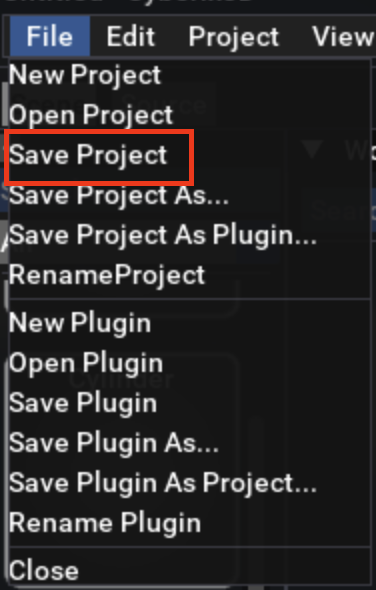
The editor is now nearly fully functional — you can work with your existing projects, save your progress, and integrate your own textures and 3D models,
including the ability to upload models with animation support for all model formats: OBJ, AWD, 3DS, MD5, DAE (Collada), FBX, Blend, and Mesh.
Most template games are already fully working, including the FPS Game, Flappy Bird, and more.
This version is also significantly more stable and includes many improvements across the board.

What's New

3D Models & Assets
* Use textures and 3D models from a shared public library or your personal uploads
* Upload your own textures and models directly from the editor
* Animation support for 3D models

Camera & Controls
* Mouse lock for first-person camera — locks automatically, ESC to release, click to re-lock
* SetCamera command — change camera position, rotation, FOV and clipping at runtime

Physics
*Polygon collision support for 3D models
*Characters can push dynamic objects with configurable force

Lighting
* Lighting defaults match the original system
* castSelfShadow property per object/material
* Visible property for lights
* Smooth lighting for imported models

Editor
* Save and load projects

Stability & Bug Fixes
* Comprehensive crash prevention across the engine
* Input validation on all properties
* Fixed animation timing and texture orientation
* Fixed Animate command for global objects (camera, engine, mouse)
* Multiple crash and stability fixes

www.gamemaker3d.com/new-cyberix3d

SCR-20260307-rgbv.jpeg


SCR-20260307-rgtq.png


SCR-20260307-rhjs.jpeg


menu_save_project.png


Best regards,
Cyberix3D Team
Last Edit: 4 months 3 days ago by cyberix3d.
The administrator has disabled public write access.
The following user(s) said Thank You: 01744379779, whinter, nima

this editor looks old 3 weeks 1 day ago #3720

  • cyberix3d
  • cyberix3d's Avatar
  • NOW ONLINE
  • Administrator
  • Posts: 803
  • Thank you received: 812
Cyberix3D 2 Alpha is here — with all the original features, and even more!

We're excited to share that the new Cyberix3D 2 Alpha is now ready!
It includes everything the old version had — and even more.

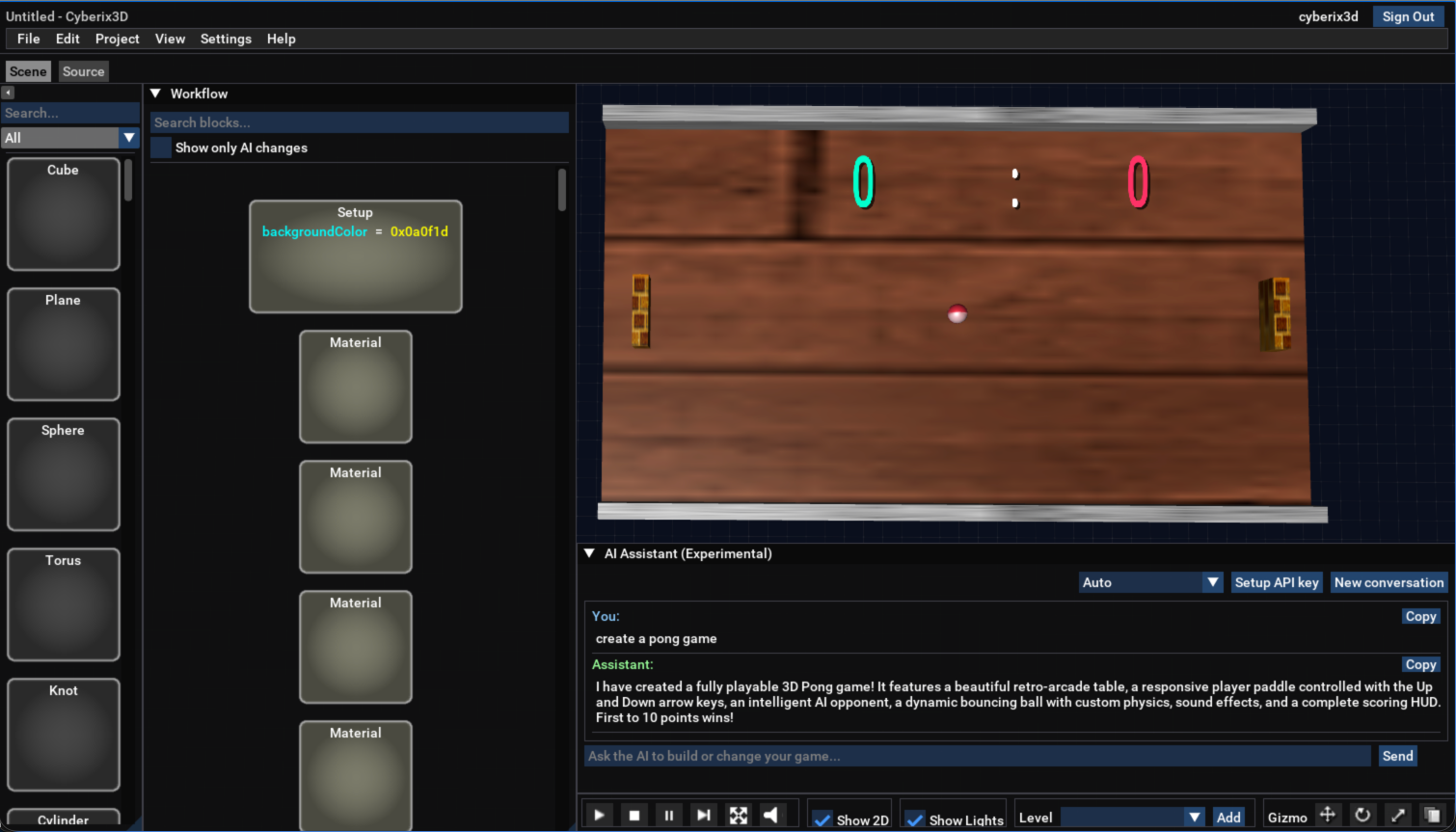
The headline feature: a built-in AI assistant (experimental)
You can now chat with an AI assistant right inside the editor.
Ask it to build a game for you, modify your existing project, or just ask questions about how things work.
It uses a "bring your own key" (BYOK) model — you plug in your own API key from a provider, and the assistant takes it from there.
Google's Gemini model even offers a free tier, so you can start trying the assistant right now at no cost.
ai-example_2026-06-20.png


Everything from the old version is back
All the features from the original Cyberix3D have been ported over.
Most existing games will work out of the box — we're not at 100% compatibility yet, but we're getting there.

Export anywhere
  • Windows — as a standalone .exe or a full installer
  • Android — Google-Play-ready APK and AAB
  • Web — play directly in the browser

First Windows release of Cyberix3D 2 — with auto-updates
This is the first time Cyberix3D 2 runs natively on Windows.
The installer includes both the editor and the Player, with built-in automatic updates so you'll always be on the latest version.
Once installed, games from the website will open directly in the new Player as well.

Coming next: local file support
We're working on a local-files feature for the Windows version that will let you work with files directly from your computer instead of uploading them to the server.
This means you'll no longer be limited by file size — your images, 3D models, and sound files can be as large as you need.
More updates on this soon!

Try it now
Give it a try and let us know what you think — your feedback during the Alpha makes a huge difference.

— The Cyberix3D Team
Last Edit: 2 weeks 6 days ago by cyberix3d.
The administrator has disabled public write access.
The following user(s) said Thank You: ViraX, whinter, Whinter_Studios

this editor looks old 2 weeks 6 days ago #3721

  • cyberix3d
  • cyberix3d's Avatar
  • NOW ONLINE
  • Administrator
  • Posts: 803
  • Thank you received: 812
Cyberix3D 2.0.1 is now available!

A new update for Cyberix3D 2 Alpha has just been released, bringing improvements to both the AI assistant and engine compatibility.

Improved AI Assistant

The built-in AI assistant is now faster and produces higher-quality results when creating and editing games.

New in this update:

* Support for additional AI models, including advanced deep-thinking modes
* Instant cancellation of AI requests
* Added support for GLM 5.2 (Z.ai)
* Added support for Kimi 2.6 (Moonshot)

Whether you're generating a new game from scratch or modifying an existing project, the assistant should now feel noticeably more capable and responsive.

Compatibility Fix: Multiple Functions with the Same Name

We've fixed an important compatibility issue with the classic Cyberix3D engine.

When multiple functions share the same name, calling that function now executes all matching functions, just like in the original engine.

Previously, only the last-defined function would run, which could silently break games that relied on patterns such as shared start handlers across multiple objects.

This change improves compatibility with existing projects and brings behavior closer to the classic engine.

Update Now

If you already have Cyberix3D 2 installed, simply launch the editor and it will update automatically through the built-in update system.

Download

* Windows download: Cyberix3D2Setup-2.0.1.exe
* Web version: https://www.gamemaker3d.com/new-cyberix3d

Thanks to everyone testing the Alpha and sharing feedback — every update gets us closer to full compatibility and an even better creation experience.

— The Cyberix3D Team
The administrator has disabled public write access.
The following user(s) said Thank You: ViraX, whinter, nima, Whinter_Studios

this editor looks old 2 weeks 3 days ago #3723

  • nima
  • nima's Avatar
  • OFFLINE
  • Fresh Boarder
  • Posts: 15
  • Thank you received: 3
Thanks for your hard works. The web version works perfectly fine but I'm facing a black screen in Windows and after that It crashes. maybe because my PC is a little too old. can you specify the requirements?
The administrator has disabled public write access.

this editor looks old 2 weeks 2 days ago #3724

  • ViraX
  • ViraX's Avatar
  • OFFLINE
  • Gold Boarder
  • Posts: 161
  • Thank you received: 126
Thank you very much for your work, and congratulations on what you've achieved!

I wanted to try the integrated AI, but I noticed that it's not possible to paste an API key using keyboard shortcuts or the right-click menu. The key has to be entered manually, which is quite time-consuming. Could you please address this issue?

Thank you again — you're amazing!
The administrator has disabled public write access.
The following user(s) said Thank You: cyberix3d

this editor looks old 2 weeks 2 days ago #3725

  • nima
  • nima's Avatar
  • OFFLINE
  • Fresh Boarder
  • Posts: 15
  • Thank you received: 3
If you're using Chrome, click the three-dot menu, go to Find and Edit, then select Paste. I tried it and it worked.
The administrator has disabled public write access.

The new Cyberix3D update 2 weeks 1 day ago #3726

  • cyberix3d
  • cyberix3d's Avatar
  • NOW ONLINE
  • Administrator
  • Posts: 803
  • Thank you received: 812
Cyberix3D 2.0.2 is now available!

A new update for Cyberix3D 2 Alpha has just been released, fixing the startup crashes some users experienced on certain machines, along with editor and asset-loading improvements.

Fix: Startup Crash on Older Graphics Cards

We've fixed a crash that prevented the app from launching on some older graphics cards.
The app was building very large font textures that certain older GPUs couldn't handle, causing it to crash on startup.
Font sizes are now lighter, so the Editor, the Player, and exported games run reliably out of the box — even on older hardware.
If you were unable to launch the app before, this update should resolve it.

Blocks Now Drag In Pre-Filled with Defaults

Dragging a block now spawns it ready to use, just like the classic editor.

For example:

* A SkyBox with its six face textures
* A Vehicle as a complete car with four wheels
* Terrain with its texture layers
* A Character with full WASD/jump controls

The block's textures and models now also appear immediately, instead of only after a reload.

Improved Asset Cache

Cloud assets are now cached under their real folder path, fixing a name clash that could stop some assets — such as certain models — from displaying or loading correctly.
The old cache is cleaned up automatically the first time you run the new version.

Update Now

If you already have Cyberix3D 2 installed, simply launch the editor and it will update automatically through the built-in update system.

Download

* Windows download: Cyberix3D2Setup-2.0.2.exe
* Web version: https://www.gamemaker3d.com/new-cyberix3d

Thanks to everyone testing the Alpha and sharing feedback — every update gets us closer to full compatibility and an even better creation experience.

— The Cyberix3D Team
The administrator has disabled public write access.
The following user(s) said Thank You: whinter, nima

The new Cyberix3D update 2 weeks 8 hours ago #3727

  • cyberix3d
  • cyberix3d's Avatar
  • NOW ONLINE
  • Administrator
  • Posts: 803
  • Thank you received: 812
New: Web Player (alpha) — play in your browser

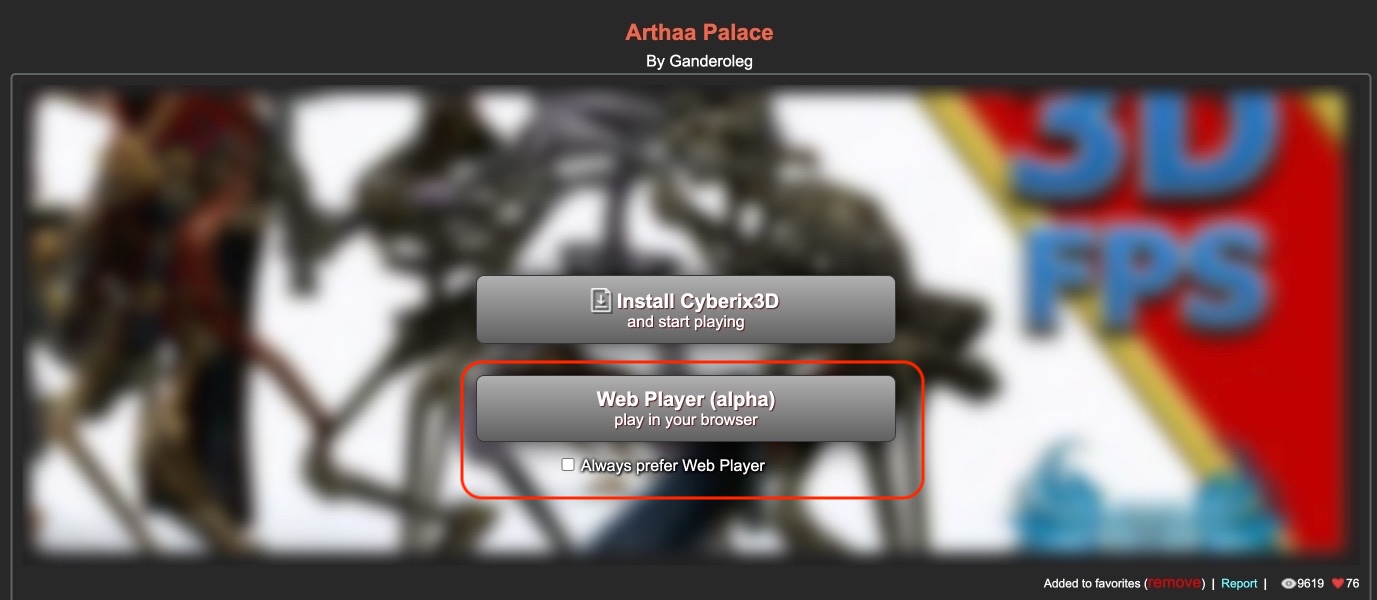
The Cyberix3D Web Player (alpha) is now live, built right into the site — play games in your browser, no install needed.

On every game page you now get two buttons:
  • Install Cyberix3D — the full desktop app (best performance).
  • Web Player (alpha) — opens the game in a new browser tab.

web_player_alpha.jpeg


By default, if you have the Cyberix3D app installed, opening a game launches it automatically in the app window — so it never interrupts your browsing.
Prefer the browser? Tick "Always prefer Web Player" — then games won't auto-open in the desktop app even if it's installed, so you can play in the browser via the Web Player button.

It's an early alpha, so some games may not run perfectly in the browser yet — your feedback really helps!

— The Cyberix3D Team
The administrator has disabled public write access.
The following user(s) said Thank You: whinter, nima

The new Cyberix3D update 2 weeks 5 hours ago #3728

  • nima
  • nima's Avatar
  • OFFLINE
  • Fresh Boarder
  • Posts: 15
  • Thank you received: 3
That's really cool, can you embed it in the page with full-screen option or maybe adding like button ?
The administrator has disabled public write access.

The new Cyberix3D update 1 week 6 days ago #3730

  • cyberix3d
  • cyberix3d's Avatar
  • NOW ONLINE
  • Administrator
  • Posts: 803
  • Thank you received: 812
Cyberix3D 2.0.3 is now available!

A new update for Cyberix3D 2 Alpha has just been released, with a redesigned block palette, customizable movement controls, new social features in the Player, and a batch of vehicle and camera fixes.

Redesigned Block Palette

The programming block palette has a fresh look. Each block now shows its own icon and just its name — instead of a long list of attributes — making blocks much easier to spot at a glance.
Textures are crisper, the layout is tidier, and a new collapse button keeps things compact while you work.

Choose Your Movement Keys

You can now pick which keys control movement for vehicles and characters — for example, the arrow keys or WASD — so your games can use the control scheme you prefer.

New Player Features: Likes, Views & Favorites

The Player now shows likes, view counts, and favorites, and players can log in.
It's easier than ever to see which games people are enjoying and to keep track of your own favorites.

Vehicle & Camera Fixes

This update fixes a range of vehicle-related bugs:

* The in-car camera now sits correctly above the wheel, with a steady, correctly-facing angle
* Steering wheels spin around their axle instead of turning left and right
* A wheel set to a 0 radius spins again
* The car body's position, model scale, and wheel ordering are all corrected

Cars now look and drive the way they should.

Stability Improvements

We also fixed an issue where a sound-setup error could crash the engine on startup.

Update Now

If you already have Cyberix3D 2 installed, simply launch the editor and it will update automatically through the built-in update system.

Download

* Windows download: Cyberix3D2Setup-2.0.3.exe
* Web version: https://www.gamemaker3d.com/new-cyberix3d

Thanks to everyone testing the Alpha and sharing feedback — every update gets us closer to full compatibility and an even better creation experience.

— The Cyberix3D Team
The administrator has disabled public write access.
The following user(s) said Thank You: whinter

The new Cyberix3D update 1 day 20 hours ago #3736

  • cyberix3d
  • cyberix3d's Avatar
  • NOW ONLINE
  • Administrator
  • Posts: 803
  • Thank you received: 812
Cyberix3D 2.1.0 is now available!

Our biggest update since 2.0 is here — bringing online multiplayer, local files from your own computer used as game assets (available offline, no upload required), one-click offline export, and a brand-new way to build games using your own AI assistant.

Online Multiplayer
You can now make games where players meet and play together in real time.
Sign in with your Cyberix3D account or join as a guest, chat in-game, and watch everyone move together with smooth, low-lag syncing.
New programming blocks — Connect, OnConnect, OnDisconnect, Chat and IfMyPlayer — plus floating 3D name labels above players (Label3D) and an on-screen scoreboard (PlayersScore / SetPlayerScore).
Every game gets its own private rooms, so different games — and forks of a game — never mix players.
Try it now: jump into a live demo and play with others — Multiplayer Test Game.

Host Your Own Multiplayer Server
Prefer to run your own rooms instead of the public relay?
You can now install the standalone Cyberix3D Relay Server on any Windows machine.
It runs quietly in the background as a Windows service with a system-tray icon and a built-in web admin page that shows the active games, rooms, and connected players — and it keeps itself up to date automatically.
It comes with its own installer.
Important — required for exported games: the public Cyberix3D multiplayer relay is available only for games played here on the website.
If you export a multiplayer game to run offline (Windows, Android, or Web), it cannot use the Cyberix3D server — it must connect to your own private Relay Server.
So if your game uses multiplayer and you plan to export it, running your own server is required.
Download the server: CbxRelayServerSetup-1.0.0.exe

Use Files From Your Own Computer — With No Size Limit
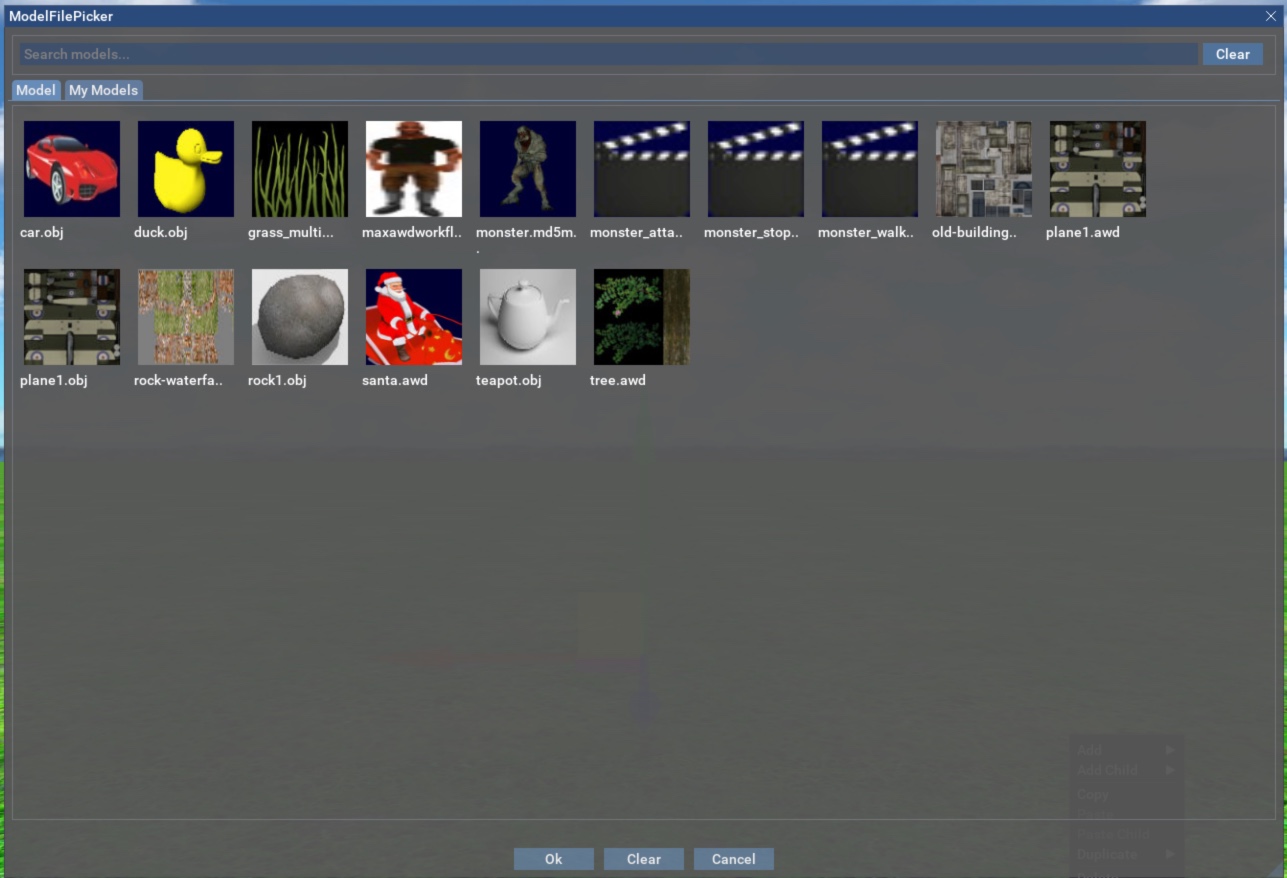
You can now import your own 3D models, textures, and sounds straight from your computer and use them in a game — with no upload and no cloud size limit.
Projects can be saved locally with those files bundled right in.
glTF / GLB models are now supported alongside the existing formats.

Sign Your Windows & Android Exports
When you export a game as a Windows build or an Android APK, you can now code-sign it.
Sign it with your own signing key, or let the editor generate a key for you — then keep that key and reuse it to sign your future updates.

Build Games With Your Own AI Assistant (MCP)
Alongside the built-in AI chat, Cyberix3D now includes an MCP server that connects the editor to the AI coding assistant you already use — Claude (Code / Desktop), Codex, Cursor, VS Code, and more.
Because it runs on your own AI subscription — including the free tiers — there's no extra per-message cost.
And unlike the in-editor chat, an MCP agent works like a real indie developer: it can search the web and download free assets from sites across the internet — 3D models (including rigged models with animations), textures, and sound effects — and import them straight into your game, at any size thanks to the new local-file support.
It reads your game, makes the edits, runs and stops it, takes screenshots to see the result and fix it, and saves and manages your projects — a full build-and-verify loop.
Just enable it in the new MCP settings dialog; it runs locally and is off by default.

2D Position Gizmo
Moving 2D objects — text, images, and HUD elements — is now much easier.
Drag them directly in the editor: use the X or Y arrow to slide along one axis, or the center handle to move freely.
It works with touch, too.

Editor Improvements
The attributes panel is now grouped and searchable, and the AI assistant panel remembers whether you left it open or closed.

Bug Fixes & Stability
This release also includes a range of bug fixes and stability improvements across the editor, engine, and exported games.

Update Now
If you already have Cyberix3D 2 installed, simply launch the editor and it will update automatically through the built-in update system.

Download
* Windows download: Cyberix3D2Setup-2.1.0.exe
* Web version: https://www.gamemaker3d.com/new-cyberix3d
* Private multiplayer server (required for exported multiplayer games): CbxRelayServerSetup-1.0.0.exe

Thanks to everyone testing the Alpha and sharing feedback — every update gets us closer to full compatibility and an even better creation experience.

-- Cyberix3D Team
Last Edit: 1 day 20 hours ago by cyberix3d.
The administrator has disabled public write access.
The following user(s) said Thank You: nima, RootBound

The new Cyberix3D update 1 day 2 hours ago #3737

A quick bug report:

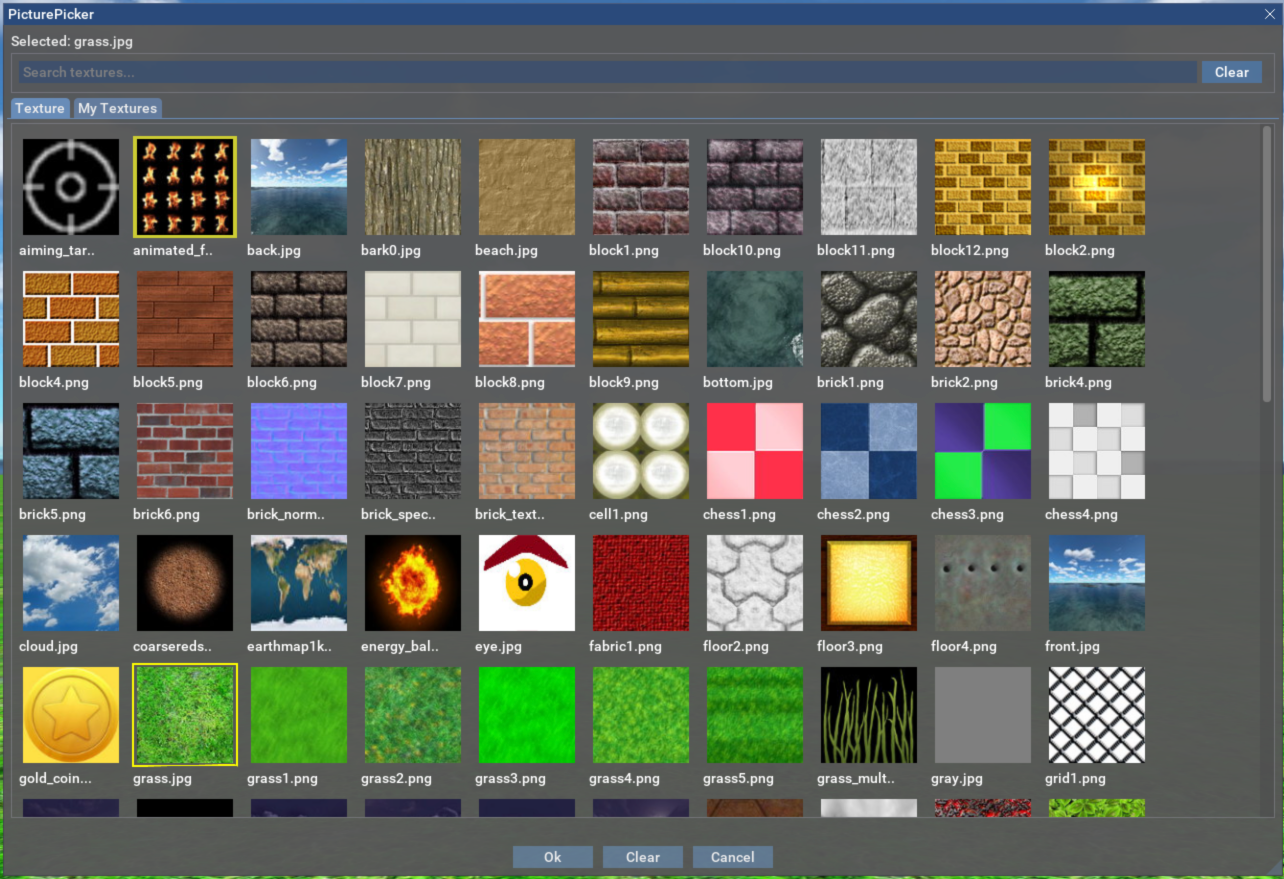
I imported a texture and tried to apply it to a plane, but when I open the texture browser, it looks like this, and I cannot click on the texture.

https://imgur.com/94612d1d-4d5e-4e90-b40b-fdfb43923324

UPDATE: this problem seems to be resolved if you close the program and then open it again

It also appears that right-clicking while the texture browsing window is open still operates on the work area as if the window isn't there.

Also, when using the online web editor, clicking "file -> close" causes the program to freeze.

Thanks for your hard work!
Last Edit: 1 day 1 hour ago by RootBound.
The administrator has disabled public write access.

The new Cyberix3D update 7 hours 5 minutes ago #3738

  • cyberix3d
  • cyberix3d's Avatar
  • NOW ONLINE
  • Administrator
  • Posts: 803
  • Thank you received: 812
Hi RootBound,

Thank you for the detailed report — this is exactly the kind of feedback that helps us improve Cyberix3D!

We were able to identify all three issues you described:
* Texture browser breaks after importing a texture — the browser renders incorrectly, and the imported texture can’t be clicked until the program is restarted. Good catch on the restart workaround; that also tells us it’s a state/refresh issue after the import rather than a problem with your texture file.

* Right-click passes through the texture browser window — clicks should be captured by the open window, not reach the workspace behind it.

* File → Close freezes the online web editor.

We’re going to investigate these issues further, and the fixes should be included in the next update. Until then, restarting the program is the best workaround for the texture browser issue.

Thanks again for taking the time to write this up, and for the kind words!

— Cyberix3D Team
Last Edit: 7 hours 2 minutes ago by cyberix3d.
The administrator has disabled public write access.

The new Cyberix3D update 1 hour 32 minutes ago #3740

Glad you were able to confirm the issues!

As I play around with and learn the program, I've encountered a few more bugs.

-Some other things do not refresh until the program is restarted. I'm not sure exactly what since I am still new to the program, but it has to do with changing the texture image of a material, which seems to not always update on an object using that material until the program is restarted.
--EDIT: This seems to apply to changing any property of the material, such as alpha blending and smoothing.
-Setting an object's texture to "both sides" also does not update until restarting the program
-When set to "both sides," the inside textures are rendering on top of the outside textures (see image below).


And one more question: In the next update, will it be possible to remove imported textures? Right now it seems there is no way to do that.

Thanks! :)
Last Edit: 1 hour 2 minutes ago by RootBound.
The administrator has disabled public write access.

The new Cyberix3D update 25 minutes ago #3741

  • cyberix3d
  • cyberix3d's Avatar
  • NOW ONLINE
  • Administrator
  • Posts: 803
  • Thank you received: 812
Thanks for the detailed follow-up, RootBound — reports like this really help! :)

On the two "needs a restart" items, we've confirmed them and passed them to the team for review:
* Changing a material's texture image not always updating on objects that use it until the program is restarted.
* Turning on Both Sides for a texture not taking effect until restart.

Restarting the editor after either change is the workaround for now, as you found.

About the inside faces rendering on top of the outside faces (your screenshot): that's usually caused by a negative (minus) scale on the object, which flips its faces.
Could you check the object's Scale values and see if any axis is negative? If one is, setting it back to a positive value should fix the ordering.

And good news on removing imported textures — you can delete them: in My Textures, right-click the texture and choose Delete. The same works for imported models and sound files.
On top of that, we're building a much more convenient interface for managing your assets, and it's already in development.

— Cyberix3D Team
Last Edit: 24 minutes ago by cyberix3d.
The administrator has disabled public write access.
Time to create page: 0.152 seconds