Remember me
You are here: HomeForum
Welcome, Guest
Username: Password: Remember me

TOPIC: The new Cyberix3D update

The new Cyberix3D update 1 week 12 hours ago #3744

  • cyberix3d
  • cyberix3d's Avatar
  • OFFLINE
  • Administrator
  • Posts: 814
  • Thank you received: 814
Cyberix3D 2.1.1 is now available!

This update introduces the new Asset Library — one place to browse, search and manage all your game assets — along with full editor control for MCP agents, Google sign-in, live material editing, and a set of editor and mobile improvements.

Asset Library
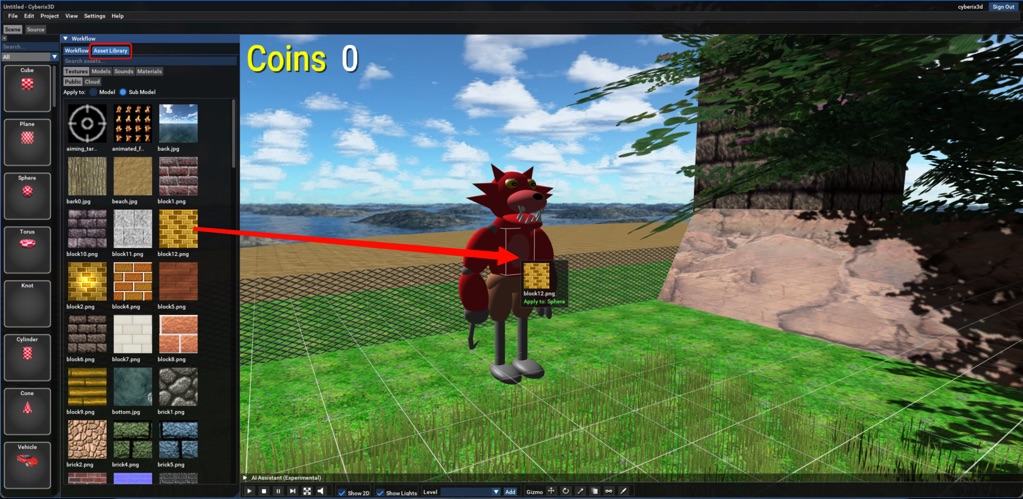
A new Assets tab in the editor lets you browse, search and manage all your game assets in one place — textures, 3D models, sounds, and the project's materials — from three sources: the public library, your cloud uploads, and local files on your own computer.
Drag a texture or material onto any object to apply it — to the whole model or just the part under your cursor.
Drop a model into the scene and it appears right at the drop point, automatically scaled to fit.
Drop a sound to add it to your game, ready to play.
You can also drag files straight from your computer into the editor to import them, upload assets to your cloud account, and export or delete existing ones.

asset-library.jpeg


MCP: Full Mouse & Keyboard Control — With Your Permission
An AI assistant connected over MCP can now control the keyboard and mouse to operate the editor and your game — click, drag, scroll, and type — for a true hands-on build-and-verify loop: the agent can play your game, press the actual buttons, and see the result.
And a new permission system keeps you in charge: the first time an agent tries a sensitive action — running the game, managing projects, exporting, or keyboard and mouse control — the editor asks you to approve it (once, always, or deny). You can review and change each permission at any time in the MCP settings dialog.

Sign in with Google
You can now log in to your Cyberix3D account with one click using your Google account, through a refreshed login dialog.

Full File Menu
Save As, Rename, and Close now work from the File menu — for both projects and plugins.

Live Material Editing
Material changes — color, alpha, texture — now apply instantly in the scene while you edit, with lighting refreshed and cloned objects staying in sync. No re-run needed.

Better Object Selection
Hold Shift while clicking with the gizmo to select a sub-model inside a model, or turn on the new setting to select sub-objects directly by default.

Editing on Mobile
The movement joystick responds reliably again, sits below the top panel, and no longer spins the camera while you steer. Editor tabs now switch with a single tap.

Bug Fixes & Stability
This release also includes bug fixes and stability improvements across the editor, engine, and exported games.

Update Now
If you already have Cyberix3D 2 installed, simply launch the editor and it will update automatically through the built-in update system.

Download
* Windows download: Cyberix3D2Setup-2.1.1.exe
* Web version: https://www.gamemaker3d.com/new-cyberix3d

Thanks to everyone testing and sharing feedback — every update gets us closer to full compatibility and an even better creation experience.

-- Cyberix3D Team
Last Edit: 1 week 12 hours ago by cyberix3d.
The administrator has disabled public write access.
The following user(s) said Thank You: nima

The new Cyberix3D update 1 week 5 hours ago #3745

  • cyberix3d
  • cyberix3d's Avatar
  • OFFLINE
  • Administrator
  • Posts: 814
  • Thank you received: 814
Cyberix3D 2.1.2 is now available!

This is a patch release focused on a critical vehicle physics fix — if you have car games, this update is for you — along with rebuilt attribute value pickers in the editor.

Critical Vehicle Physics Fix
A physics bug could leave cars stuck in the ground, and kept vehicles from reaching their full speed — so they couldn't clear loops, ramps and obstacles.
Both issues are now fixed: vehicle speed and handling match the classic engine again. This was critical for existing car games — stunt tracks like loop-the-loops now play exactly as originally designed.

Better Attribute Value Pickers
Attribute pickers were rebuilt to match the classic editor — including scene-object, animation, collision and target pickers — with Add buttons to create what's missing right from the picker.

Update Now
If you already have Cyberix3D 2 installed, simply launch the editor and it will update automatically through the built-in update system.

Download
* Windows download: Cyberix3D2Setup-2.1.2.exe
* Web version: https://www.gamemaker3d.com/new-cyberix3d

Thanks to everyone testing and sharing feedback — every update gets us closer to full compatibility and an even better creation experience.

-- Cyberix3D Team
The administrator has disabled public write access.

The new Cyberix3D update 6 days 16 hours ago #3746

  • nima
  • nima's Avatar
  • OFFLINE
  • Fresh Boarder
  • Posts: 18
  • Thank you received: 3
That's great! However, I'm experiencing a force close when I export the Android app, both in local and online, on my phone.
The administrator has disabled public write access.

The new Cyberix3D update 6 days 16 hours ago #3747

  • cyberix3d
  • cyberix3d's Avatar
  • OFFLINE
  • Administrator
  • Posts: 814
  • Thank you received: 814
Hi Nima, thanks for reporting this — sorry about the crash!

Just to make sure we understood correctly: the export itself completes fine, but the exported Android app force closes immediately when you launch it on your phone (with both the local and the online export).

To help us track it down, could you reply with:

* Does this happen with every game you export, or only with this specific game? If it's only this game, please share a link to it so we can test the exact same project.

* Your phone model and Android version.

In the meantime we've passed this to the team for investigation. Thanks for your patience!

— Cyberix3D Team
Last Edit: 6 days 16 hours ago by cyberix3d.
The administrator has disabled public write access.

The new Cyberix3D update 6 days 16 hours ago #3748

  • nima
  • nima's Avatar
  • OFFLINE
  • Fresh Boarder
  • Posts: 18
  • Thank you received: 3
The export works fine it gaves the .apk but the app crashes. I managed to export both locally and cloud, and to be sure I tried it in 3 different games in the Cyberix3D 2.
B.T.W the Windows and web exports works fine.
device info:
Android 13, SAMSUNG GALAXY A51
Last Edit: 6 days 16 hours ago by nima. Reason: added device info
The administrator has disabled public write access.

The new Cyberix3D update 6 days 15 hours ago #3749

  • cyberix3d
  • cyberix3d's Avatar
  • OFFLINE
  • Administrator
  • Posts: 814
  • Thank you received: 814
Thanks a lot for the follow-up and the details, Nima — that's exactly what we needed.

Since the force close happens with 3 different games, with both local and online export, and the Windows/web exports of the same games run fine, this looks like a real defect in the Android export itself rather than something in your projects. I've passed it to the team for review together with your device info (Samsung Galaxy A51, Android 13).

We'll update this thread as soon as there's news.

— Cyberix3D Team
The administrator has disabled public write access.

The new Cyberix3D update 5 days 15 hours ago #3750

Hello,

As requested, I have verified that the object with the texture issue is both positive on all scale axes and positive in all dimensions.

Here is a copy of the project so that you can see the issue.

www.mediafire.com/file/tm3n29w0z7wcydj/Test.zip/file

In addition, changing the "both sides" setting on the object's texture still does not update the object until the program is restarted.

Thank you.
The administrator has disabled public write access.

The new Cyberix3D update 5 days 15 hours ago #3751

  • cyberix3d
  • cyberix3d's Avatar
  • OFFLINE
  • Administrator
  • Posts: 814
  • Thank you received: 814
Hi RootBound,

Thank you for verifying the scale/dimensions and for uploading the test project — the team was able to look into it directly.

The texture issue: it's caused by the alphaBlending setting on your BusTexture. Remove (disable) alphaBlending from the BusTexture and the object will render correctly — no other changes needed.

About the Both Sides setting: you're right that something is off here. Right now, changing bothSides takes effect immediately only when you change it on the Material itself — changing it through the object doesn't update the rendering until the program is restarted. That's a defect on our side and we're going to fix it. Until then, either change bothSides directly on the Material, or use the restart workaround you found.

Thanks again for the detailed report and the test project — it really helps.

— Cyberix3D Team
The administrator has disabled public write access.

The new Cyberix3D update 5 days 14 hours ago #3752

Hello,

So just to clarify - it is not possible to have any object render correctly if the material has alpha blending enabled and the object has texture on both sides? I would like to have objects where you can "see inside" the object through "windows" on the object itself, which would require both material alpha blending and also having texture on both sides.

Thanks.
The administrator has disabled public write access.

The new Cyberix3D update 5 days 13 hours ago #3754

  • cyberix3d
  • cyberix3d's Avatar
  • OFFLINE
  • Administrator
  • Posts: 814
  • Thank you received: 814
Hi RootBound,

Good question — you can get see-through windows on a both-sided object. The key is to use alphaBlending together with alphaThreshold on the Material.

alphaBlending is meant only for transparent or semi-transparent (glass-like) materials. Once it is enabled, depth checking is switched off, so polygons can draw over each other in the wrong order — combined with bothSides, that is exactly the incorrect rendering you ran into.

alphaThreshold is what makes it work: pixels whose texture alpha is below the threshold are discarded completely, so the fully transparent "window" areas can never draw over the geometry behind them. For the pixels that remain — semi-transparent ones with alpha below 1 — the order in which polygons are drawn doesn't really matter visually, so the blending looks correct.

So make the window areas of your texture fully transparent (a PNG with an alpha channel) and set both attributes together on the Material.

If you want semi-transparent glass panes rather than fully open windows, just paint those areas with partial alpha in the texture — the same material handles both.

— Cyberix3D Team
Last Edit: 5 days 13 hours ago by cyberix3d.
The administrator has disabled public write access.
Time to create page: 0.124 seconds