Remember me
You are here: HomeForum
Welcome, Guest
Username: Password: Remember me

TOPIC: PNG image on a plane

PNG image on a plane 1 month 3 weeks ago #3714

  • whinter
  • whinter's Avatar
  • OFFLINE
  • Senior Boarder
  • Hi, I try to make cool games for the community
  • Posts: 71
  • Thank you received: 16
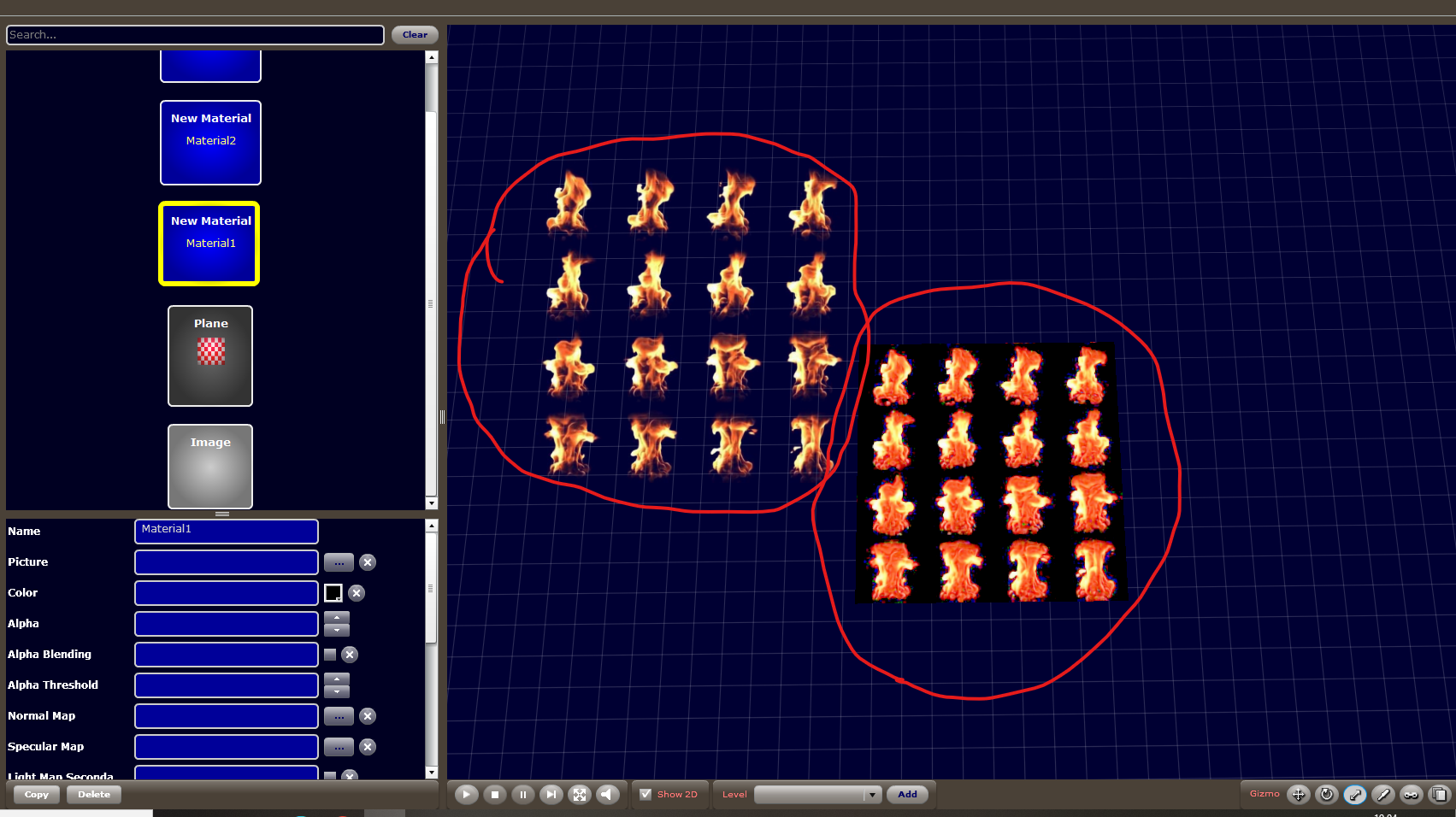
I want to add an image with a transparent background to the plate, but the plate itself doesn't have a transparent background—it's black. However, if I apply this texture to a standard image, the background *is* transparent.
The administrator has disabled public write access.

PNG image on a plane 1 month 3 weeks ago #3715

  • cyberix3d
  • cyberix3d's Avatar
  • OFFLINE
  • Administrator
  • Posts: 814
  • Thank you received: 814
Hello whinter,

We’re not completely sure we understand what you mean.
Could you please share an example and explain the expected result a bit more?

If possible, please also attach:

* A screenshot of the issue
* The texture/image you are using
* A View Source example (or material/shader settings) showing how the plate and texture are set up

From your description, it sounds like the transparent PNG works correctly on a standard image, but when applied to the plate the transparent areas become black instead of transparent.
We’d like to better understand exactly what setup you are using and what behavior you expect.

-- Cyberix3D team
The administrator has disabled public write access.

PNG image on a plane 1 month 3 weeks ago #3716

  • whinter
  • whinter's Avatar
  • OFFLINE
  • Senior Boarder
  • Hi, I try to make cool games for the community
  • Posts: 71
  • Thank you received: 16
Yes, of course. Among the basic plugins available when creating a project, there is one called "FPS Game Project." It includes a torch asset that utilizes a fire texture with a transparent background; however, instead of the transparency, I am seeing a solid black background. I did notice, though, that the PNG file's transparency is only displayed correctly within the "Image" block; in other contexts, it appears as black rather than transparent.
2026-05-22190451.png
The administrator has disabled public write access.

PNG image on a plane 1 month 3 weeks ago #3717

  • whinter
  • whinter's Avatar
  • OFFLINE
  • Senior Boarder
  • Hi, I try to make cool games for the community
  • Posts: 71
  • Thank you received: 16
Oh, I found the material parameter for this :) . Thanks for trying to help me with this problem! :cheer:
The administrator has disabled public write access.

PNG image on a plane 1 month 3 weeks ago #3718

  • cyberix3d
  • cyberix3d's Avatar
  • OFFLINE
  • Administrator
  • Posts: 814
  • Thank you received: 814
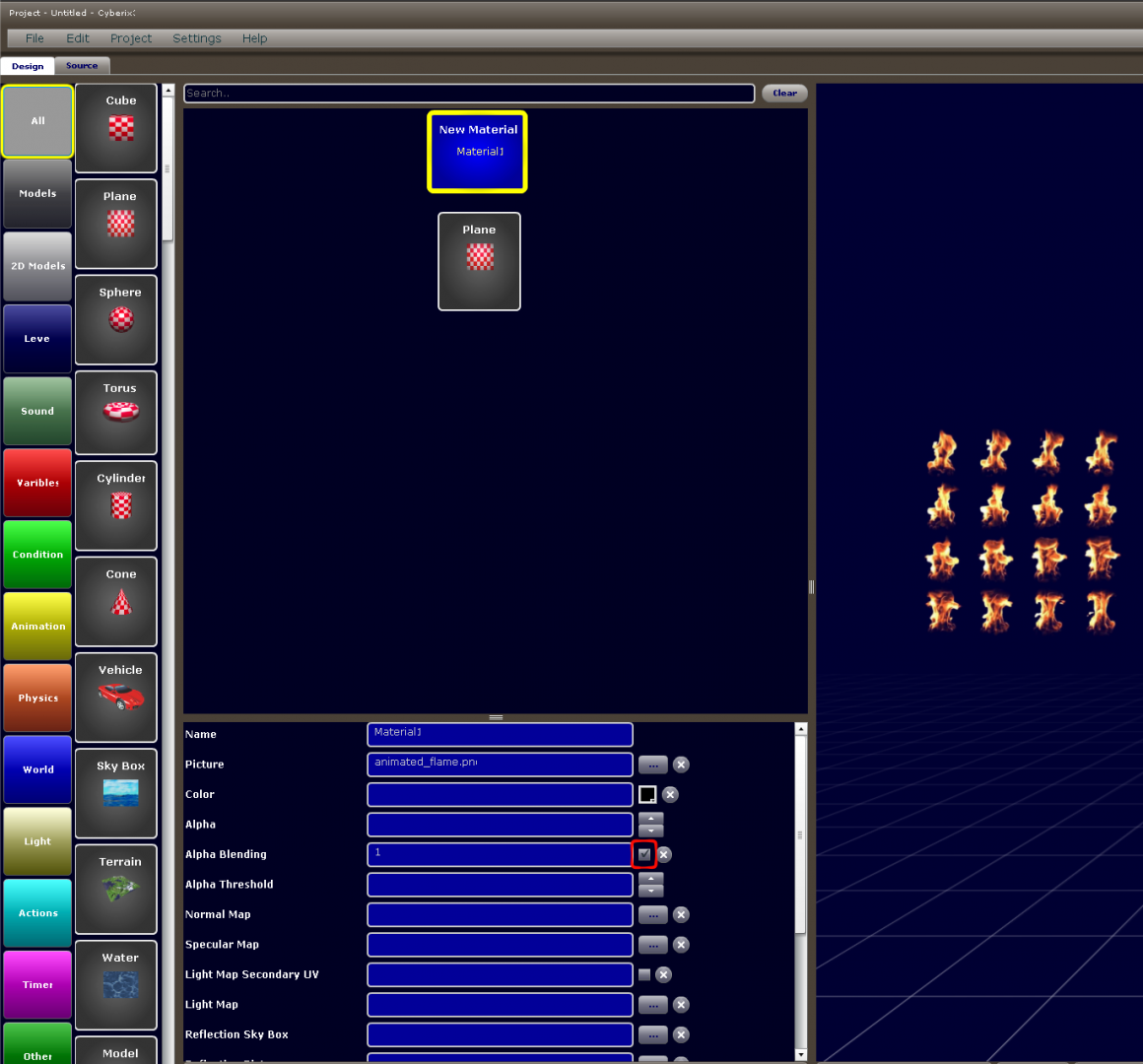
You need to enable Alpha Blending on the material for the PNG transparency to be applied correctly to the material/plane.

In your screenshot, once Alpha Blending is checked on the material, the transparent parts of the PNG should render properly instead of appearing black.

SCR-20260522-qwqg.png


— Cyberix3D Team
The administrator has disabled public write access.
The following user(s) said Thank You: whinter
Time to create page: 0.112 seconds