Remember me
You are here: HomeForum
Welcome, Guest
Username: Password: Remember me

TOPIC: Cyberix3D 2.1.3 is now available!

Cyberix3D 2.1.3 is now available! 5 days 13 hours ago #3756

  • cyberix3d
  • cyberix3d's Avatar
  • OFFLINE
  • Administrator
  • Posts: 814
  • Thank you received: 814
Cyberix3D 2.1.3 is now available!

This update focuses on making local game export solid — especially on Android — along with a physics default fix.

Android export crash fixed
Games exported as Android APKs crashed immediately on startup. This is now fixed — your exported games launch correctly on Android devices.

Better local game export
Exported OBJ models now include their material and texture files, so your models keep their look outside the editor. Models that use built-in default textures are no longer transparent in exported games. And exported Android apps now show your game's name and your game's icon instead of the Cyberix3D defaults.

Physics defaults
The default object friction now matches the classic engine, so existing games behave as originally designed.

Update Now
If you already have Cyberix3D installed, it will offer the update automatically the next time you open it.

Download
Windows: www.gamemaker3d.com/updates/win/Cyberix3D2Setup-2.1.3.exe
Or play right in your browser: www.gamemaker3d.com/new-cyberix3d

Thanks for all your feedback and the amazing games you keep creating!

-- Cyberix3D Team
The administrator has disabled public write access.

Cyberix3D 2.1.3 is now available! 4 days 3 hours ago #3757

Some bug reports:
-If the keyboard map on a CameraController is set to use both arrow and wasd keys, no keys respond when running the game. If it is set to only wasd or only arrow keys then it functions correctly.

-Changing a material's "Alpha blending" to enabled or disabled causes textures on the object using the material to change how they are mapped onto the object. On a cube, for example, textures that were on one face will switch to a different face when enabling or disabling alpha blending on the material.

-Changing "both sides" on a material will not update the object until the program is restarted.

-Clicking the "x" button to close the program will not give any kind of prompt about losing changes to the project. It will simply close, and give an option to restore the autosave when the program is restarted.
Last Edit: 4 days 3 hours ago by RootBound.
The administrator has disabled public write access.

Cyberix3D 2.1.3 is now available! 3 days 16 hours ago #3758

  • cyberix3d
  • cyberix3d's Avatar
  • OFFLINE
  • Administrator
  • Posts: 814
  • Thank you received: 814
Thanks for the detailed bug reports, RootBound! These are really helpful — we've passed all of them to the team for investigation and review.

A few notes in the meantime:

- CameraController keys not responding with "Wasd + Direction keys": confirmed on our side — for now, set the keysMode to only Wasd keys or only Direction keys and it will respond correctly.
- Alpha blending changes texture mapping / "both sides" needs a restart: both look like rendering-state refresh issues on the material. We're investigating; a restart is the current workaround for "both sides" until it's fixed. On top of the fix, we also plan to add a depth write option for textures using alpha blending, so transparent materials can be drawn in the correct order — think car windows and similar see-through surfaces.
- No "unsaved changes" prompt when closing with the X: good catch — we're going to add a warning message when you close the editor so you don't lose unsaved project changes, and we've passed this to the team to implement. In the meantime your work isn't lost either — the editor keeps an autosave, which is why it offers to restore on the next launch.

We can't promise a date, but thanks again for taking the time to write these up clearly — it makes them much easier to fix.

— Cyberix3D Team
The administrator has disabled public write access.

Cyberix3D 2.1.3 is now available! 3 days 12 hours ago #3760

  • nima
  • nima's Avatar
  • OFFLINE
  • Fresh Boarder
  • Posts: 18
  • Thank you received: 3
Hello,

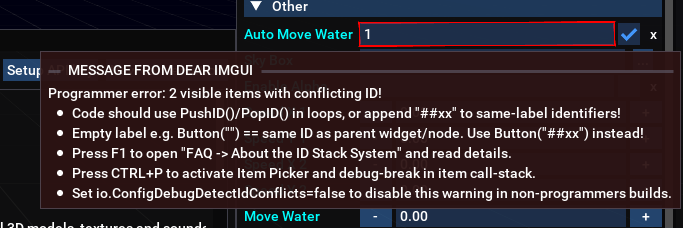
I was adding water to my game and noticed there are two "Auto Move Water" options. Is that intentional?

imgui.png


I also noticed an issue with the terrain images. When I try to change certain textures, instead of opening the Texture Picker, it opens the Variable Picker dialog.
The administrator has disabled public write access.

Cyberix3D 2.1.3 is now available! 3 days 11 hours ago #3761

  • cyberix3d
  • cyberix3d's Avatar
  • OFFLINE
  • Administrator
  • Posts: 814
  • Thank you received: 814
Thanks for the detailed report, Nima!

Both of these look like editor bugs rather than anything you did wrong.

Two "Auto Move Water" options
That's not intentional. The Water object only has a single autoMoveWater setting, so the attribute panel is simply showing the same toggle twice — either checkbox controls the same thing. We've passed it to the team to clean up the duplicated entry.

Terrain textures opening the Variable Picker
That's also a bug. Those Terrain texture fields (for example texturePicture, beachPicture, grassPicture, rockPicture, blendPicture) should open the Texture Picker, not the Variable Picker. It's been logged with the team.

In the meantime, if you hit the wrong dialog you can still assign terrain textures directly in the code/XML, for example:

<Terrain texturePicture="terrain_diffuse.jpg" beachPicture="beach.jpg" grassPicture="grass.jpg" rockPicture="rock.jpg" blendPicture="terrain_splats.png" heightMap="terrain_heights.jpg" terrainWidth="10000" terrainDepth="10000" terrainHeight="2500"/>


Thanks again for flagging these — reports like this are exactly what help us tighten things up.

— Cyberix3D Team
Last Edit: 3 days 11 hours ago by cyberix3d.
The administrator has disabled public write access.
Time to create page: 0.102 seconds