Remember me
You are here: HomeForumCyberix3D ForumGeneral Discussion
Welcome, Guest
Username: Password: Remember me

TOPIC: Hide the image

Hide the image 1 year 2 months ago #3425

  • Mohamadjavad-
  • Mohamadjavad-'s Avatar
  • OFFLINE
  • Fresh Boarder
  • IranianGameCreator
  • Posts: 18
Hello.
I created two levels in my project.
In the first level a small image is displayed in the middle of the screen and in the second level the image should disappear.
Currently when I go from the first level to the second level the image is still displayed.
I want to make the image appear only in the first level.
What should I do?
The administrator has disabled public write access.

Hide the image 1 year 2 months ago #3427

  • whinter
  • whinter's Avatar
  • OFFLINE
  • Senior Boarder
  • Hi, I try to make cool games for the community
  • Posts: 71
  • Thank you received: 16
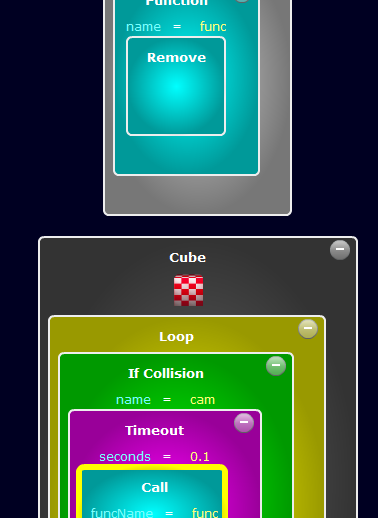
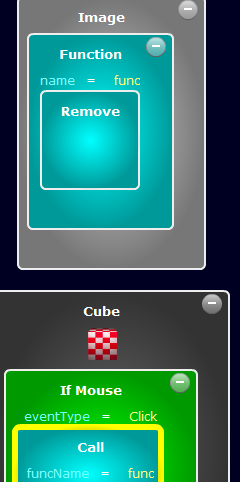
you are probably using teleportation to the level via click or touch of camera or player. you can make it so that when camera or camera/player is touched, a signal is sent to a function inside the image, this is how it would look:
(namely, when you touch or press, not only does the transition to the level occur, but also the image is deleted)
(sorry if this is not what you wanted :) )
Attachments:
Last Edit: 1 year 2 months ago by whinter.
The administrator has disabled public write access.
The following user(s) said Thank You: cyberix3d, Symbiotic Interactives

Hide the image 1 year 2 months ago #3428

You could also use a "set" codeblock and toggle the visibility of the image so that you can use it again in the future instead of outright removing the image.
The administrator has disabled public write access.
The following user(s) said Thank You: cyberix3d, whinter
Time to create page: 0.100 seconds